Advanced FPSMENU

설명
CordobitaScripts Performance es un recurso 100 % client-side para FiveM diseñado para que cada jugador pueda optimizar sus gráficos y mejorar el rendimiento sin necesidad de base de datos y sin generar carga adicional en el servidor.
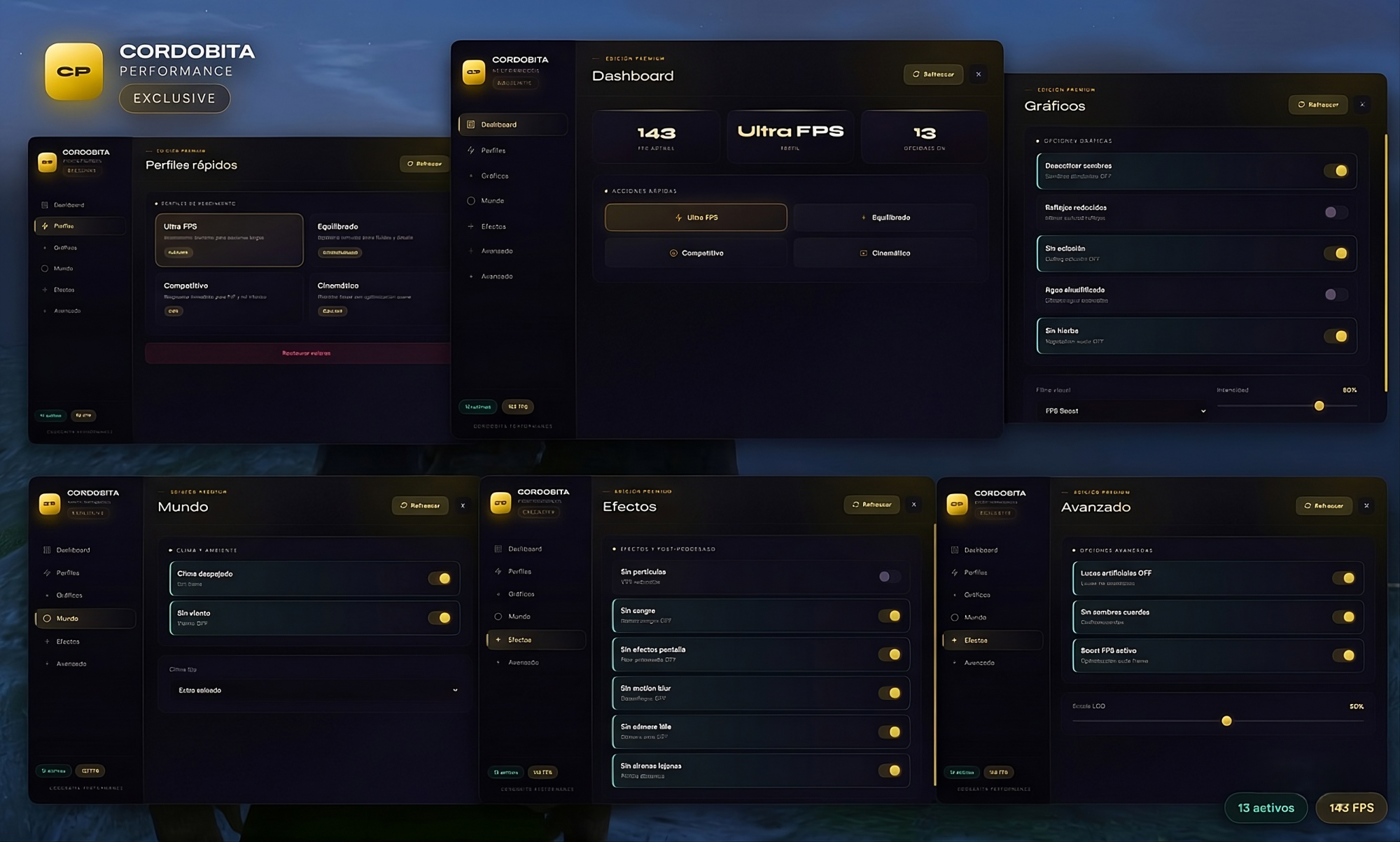
Cuenta con un panel intuitivo en una sola vista que muestra FPS aproximados, perfil activo y cantidad de opciones habilitadas. Incluye perfiles rápidos como Ultra FPS, Equilibrado, Competitivo y Cinemático, además de ajustes avanzados para sombras, reflejos, oclusión ambiental, agua y vegetación.
También incorpora filtros visuales (timecycle) con control de intensidad, opciones de clima y viento con posibilidad de fijar climas específicos, y una sección avanzada para configurar luces, cuerdas, boost de rendimiento y escala LOD.
En el apartado de efectos, permite gestionar partículas, sangre, efectos de pantalla, motion blur, cámara idle y sirenas lejanas, ofreciendo un control total sobre la experiencia visual y el rendimiento.
La configuración se guarda localmente para cada jugador en el cliente. El recurso incluye soporte en español e inglés desde config.lua, utilizando archivos JSON para los textos. Es compatible con QBCore, ESX y servidores standalone, además de contar con notificaciones adaptables.
Por defecto, el menú se abre con F7, aunque también incluye comandos y exports para integrarlo fácilmente con otros scripts.
Nota: las opciones están orientadas a reducir la carga gráfica en el cliente y mejorar la fluidez del juego, pero no sustituyen las limitaciones del hardware del usuario ni del propio servidor.
//ENG
CordobitaScripts Performance is a fully client-side resource for FiveM designed to let every player optimize graphics and improve performance without requiring a database or adding extra load to the server.
It features an intuitive all-in-one panel that displays approximate FPS, the active profile, and the number of enabled options. It includes quick presets such as Ultra FPS, Balanced, Competitive, and Cinematic, along with advanced settings for shadows, reflections, ambient occlusion, water, and vegetation.
The resource also includes visual filters (timecycles) with intensity control, weather and wind options with the ability to lock specific weather types, and an advanced section for configuring lights, ropes, performance boost, and LOD scale.
In the effects section, players can manage particles, blood effects, screen FX, motion blur, idle camera, and distant sirens, giving full control over both visual quality and performance.
All settings are saved locally on each player's client. The resource supports both Spanish and English through config.lua, using JSON files for translations. It is fully compatible with QBCore, ESX, and standalone servers, and includes adaptable notification support.
By default, the menu opens with F7, but it also includes commands and exports for easy integration with other scripts.
Note: these options are designed to reduce graphical load on the client and improve gameplay smoothness, but they do not replace hardware or server limitations.